WinMorph

WinMorph
License:
Free
Language:
English
Developer:
OS:
Win95/98/98SE/Me/2000/NT/XP
Added:
See detailed info

Softonic review

Elena Santos

“Create image morphing and warping effects”

by Elena Santos about WinMorph

If you've always wanted to create one of those attractive morphing effects with your pictures, this is your opportunity.

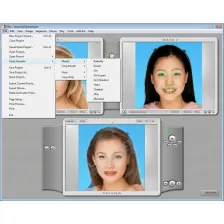
Simply download WinMorph and use your own digital photos to create morphing or warping effects in just a few steps. Even though the program is not as intuitive as other similar tools – it doesn't the traditional dot system, but a shape one instead – it's still a fairly easy way to create eye-catching animations with almost no effort.

Warping effects enable you to change the expression on a face or modify the shape of any given object on a picture, while morphing effects involve a smooth transition from one photo to another. In case you need any help, the program includes some basic tutorials to get you started.

WinMorph can export your creations to a wide variety of formats, including AVI, MPEG and even SWF (Flash). On the downside, as we mentioned before, the program doesn't achieve a very high degree of usability – especially on its interface.

With WinMorph – and a little patience from your side – you'll be able to create awesome warping or morphing effects and export them to several different formats.

Pros
  • Enables you to create both warping and morphing effect
  • Support for many formats
Cons
  • Confusing interface
  • Not as intuitive as other similar tools
Free Download WinMorph 3.01

WinMorph is virus free

We have analyzed the latest version of WinMorph with 30 antivirus engines and it is virus free. See analysis results.

TESTED VIRUS FREE - Softonic GUARANTEED

Developer's description

WinMorph is a high performance morphing and warping software. With over 400,000 downloads and much more distributed through PC magazines and their CDROMs, WinMorph enjoys a very wide userbase, have been used in movies such as Dreamcatcher and real life projects such as roadshows for promoting products.

See what this program features for you:

  • Professional quality warping and morphing tools.
  • Works both as a standalone application and as a plug-in for various video editors to get best of both worlds.
  • Intuitive shape-based morphing for both ease of use and high degree of freedom.
  • Advanced keyframing, blending and distortion tools for total control.
  • Can do dynamic morphing (also called video morphing).

Review and rate WinMorph

Your avatar

Your opinion is important.
Help other users - be the first to review this program.

Review
  1. Maximum: 75 characters

  2. See example

Pros and Cons
Rate
  1. What rating would you give WinMorph?

    You need to fill in all fields

    • Usability:

      Not rated
    • Stability:

      Not rated
    • Installation:

      Not rated
    • Functionality:

      Not rated
    • Appearance:

      Not rated
    • Overall rating:

      Not rated
  2. Don't worry, we won't make your email address public.

You're not allowed to share serial numbers, cracks, etc. or link to pages that contain them. If you do, your user account will be deleted, your IP address logged and legal action will be taken.

Get started - just ask a question!

Write a title for your question.

Alternativesto WinMorph

  • In English:
    Popims Animator
    Popims Animator

    Powerful tool for creating transitions between images

    Softonic rating:
    • 7/10
    User rating:
    • 9/10
  • Better rating:
    DeformerPro
    DeformerPro

    Easy warping effects for your photos

    Softonic rating:
    • 9/10
    User rating:
    • 8/10
Compare with WinMorph
Download rank: Morphing

6 of 21

Softonic rating:
  • Very good
  • 8/10
User rating: (4 ratings)
  • Not bad
  • 7/10
Your rating:
Your rating
  • 0

Review and rate this program

Blog posts about WinMorph

More

Top Downloads: Morphing

  • United States
  • Global

  1. Distort pictures of your friends

Reviews of WinMorph in other languages